
NicheSphere × PILOT: niche-based trajectory inference#
This tutorial demonstrates how to combine NicheSphere niches with PILOT to compute sample-level disease trajectories from spatial transcriptomics data.
PILOT (PatIent Level distance with Optimal Transport) computes distances between tissue samples using optimal transport on cell type proportions. By using NicheSphere niches as the grouping variable — rather than individual cell types — we obtain niche-informed distances that better reflect the spatial organisation of disease.
Prerequisites: This tutorial assumes you have cloned the NicheSphere github repo and run the main NicheSphere MI Visium tutorial (Nichesphere_tutorial_MIvisium.ipynb) and have the following files available under NicheSphere/data/:
heart_MI_ST_SC_23samples.h5mu— MuData object with Visium and scRNA-seq dataCTprops.csv— cell type proportions per spotcolocPerSample.csv— co-localization probabilities per sampleniches_df_MIvisium_louvain.csv— niche–cell type–color correspondence tableMI_sampleTypesDF.csv— sample–condition mapping
In this tutorial we will:
Prepare spot-level niche annotations from co-localization niches
Compute sample-to-sample Wasserstein distances using PILOT
Infer a disease trajectory and compute pseudotime
Identify niches and cell type pair co-localizations that change along the trajectory
1. Setup#
[1]:
import pandas as pd
import numpy as np
import scipy
import matplotlib.pyplot as plt
import scanpy as sc
import mudata as md
import pilotpy as pl
2. Data#
We load the MI Visium MuData object and the outputs from the NicheSphere co-localization tutorial.
[2]:
mudata = md.read('../../data/MIvisium/PILOT_tutorial/heart_MI_ST_SC_23samples.h5mu')

sampleTypesDF = pd.read_csv('../../data/MIvisium/PILOT_tutorial/MI_sampleTypesDF.csv', index_col=0)
CTprops       = pd.read_csv('../../data/MIvisium/PILOT_tutorial/CTprops.csv', index_col=0)
coloc         = pd.read_csv('../../data/MIvisium/PILOT_tutorial/colocPerSample.csv', index_col=0)

niches_df = pd.read_csv('../../data/MIvisium/PILOT_tutorial/niches_df_MIvisium_louvain.csv')
niches_df['niche'] = niches_df['niche'].astype('category')
Co-localization table#
Since co-localization between cell type A–B equals that of B–A, we remove duplicate columns to avoid counting them twice. We then multiply the remaining non-self-interaction pairs by 2 to preserve the correct scale.
[3]:
cell_types = CTprops.columns
oneCTints  = cell_types + '-' + cell_types  # same-cell-type pairs

coloc = coloc.T.drop_duplicates().T
coloc[np.setdiff1d(coloc.columns, oneCTints)] *= 2
coloc.head()
[3]:
| Fib1_SCARA5-Fib1_SCARA5 | Fib1_SCARA5-damaged_CM | Fib1_SCARA5-Capillary_Endo | Fib1_SCARA5-LYVE_FOLR_Macrophages | Fib1_SCARA5-Fib3_C7 | Fib1_SCARA5-healthy_CM | Fib1_SCARA5-Fib2_Myofib | Fib1_SCARA5-Endocardial_Endo | Fib1_SCARA5-Arterial_Endo | Fib1_SCARA5-Neuronal | ... | NK-CD_8 | NK-Adipo | NK-NK_T | CD_8-CD_8 | CD_8-Adipo | CD_8-NK_T | Purkinje_fibers-Purkinje_fibers | Adipo-Adipo | Adipo-NK_T | NK_T-NK_T | |
|---|---|---|---|---|---|---|---|---|---|---|---|---|---|---|---|---|---|---|---|---|---|
| control_P17 | 0.017603 | 0.000617 | 0.001985 | 0.000501 | 0.014124 | 0.005172 | 0.009448 | 0.001886 | 0.000824 | 0.000702 | ... | 0.000143 | 0.0 | 9.077312e-08 | 0.001856 | 0.0 | 9.112006e-08 | 0.000143 | 0.000000 | 0.000000e+00 | 0.000268 |
| RZ_P9 | 0.009307 | 0.000858 | 0.001475 | 0.000007 | 0.010408 | 0.002878 | 0.003250 | 0.000129 | 0.000336 | 0.000091 | ... | 0.000420 | 0.0 | 1.990927e-04 | 0.001618 | 0.0 | 3.286973e-05 | 0.000249 | 0.000571 | 0.000000e+00 | 0.000784 |
| IZ_P15 | 0.030351 | 0.000000 | 0.000054 | 0.000372 | 0.002401 | 0.000000 | 0.006223 | 0.000145 | 0.000123 | 0.000000 | ... | 0.000000 | 0.0 | 0.000000e+00 | 0.000000 | 0.0 | 0.000000e+00 | 0.000000 | 0.000000 | 0.000000e+00 | 0.000000 |
| RZ_P6 | 0.040470 | 0.000882 | 0.005503 | 0.000722 | 0.017374 | 0.005856 | 0.015756 | 0.000352 | 0.002045 | 0.002340 | ... | 0.000141 | 0.0 | 1.718785e-27 | 0.001029 | 0.0 | 0.000000e+00 | 0.000000 | 0.000000 | 0.000000e+00 | 0.000438 |
| RZ_BZ_P3 | 0.021508 | 0.000585 | 0.001135 | 0.000115 | 0.004816 | 0.000966 | 0.013271 | 0.000245 | 0.000105 | 0.000103 | ... | 0.000375 | 0.0 | 1.717062e-05 | 0.001783 | 0.0 | 0.000000e+00 | 0.000373 | 0.001115 | 1.458913e-34 | 0.000897 |
5 rows × 556 columns
3. Prepare data for PILOT#
PILOT requires a spot-level AnnData with:
obs['niche']— the dominant niche for each spot (based on cell type proportions)obs['patient_region_id']— sample identifierobs['status']— condition labelobsm['CTprops']— cell type proportions per spot (used to compute niche-to-niche cost matrices)
We assign each spot to its dominant niche by finding the niche with the highest summed cell type proportion.
[4]:
all_niches = pd.DataFrame()

for smpl in sampleTypesDF['sample'].unique():
    tmp = mudata['visium'][mudata['visium'].obs.patient_region_id == smpl].copy()
    tmp.obs['status'] = sampleTypesDF.loc[sampleTypesDF['sample'] == smpl, 'sampleType'].values[0]

    # Compute niche proportion per spot as sum of constituent cell type proportions
    for niche in niches_df.niche.cat.categories:
        tmp.obs[niche] = CTprops[list(niches_df.cell[niches_df.niche == niche])].sum(axis=1)

    niche_props = tmp.obs[list(niches_df.niche.cat.categories)]
    tmp.obs['niche'] = [niche_props.columns[np.argmax(niche_props.loc[idx])] for idx in niche_props.index]
    tmp.obs['niche'] = tmp.obs['niche'].astype('category')

    # Ensure all niche categories are present (required for PILOT)
    for c in np.setdiff1d(list(niches_df.niche.cat.categories), tmp.obs.niche.cat.categories):
        tmp.obs['niche'] = tmp.obs['niche'].cat.add_categories(c)
    tmp.obs['niche'] = tmp.obs['niche'].cat.reorder_categories(list(niches_df.niche.cat.categories))

    all_niches = pd.concat([all_niches, tmp.obs[['niche', 'patient_region_id', 'status']]])
Remote zone samples are healthy tissue from a diseased patient — we simplify them to 'myogenic' to group them with controls:
[5]:
all_niches['status'] = ['myogenic' if x == 'remote' else x for x in all_niches['status']]
all_niches['status'].value_counts()
[5]:
status
myogenic    27357
fibrotic    18571
ischemic    16552
border      11424
Name: count, dtype: int64
[6]:
adata = mudata['visium'].copy()
adata.obs = all_niches

adata.obsm['CTprops'] = CTprops.loc[all_niches.index].fillna(0)
adata
[6]:
AnnData object with n_obs × n_vars = 73904 × 11704
    obs: 'niche', 'patient_region_id', 'status'
    var: 'features'
    obsm: 'X_pca', 'X_spatial', 'X_umap', 'CTprops'
4. PILOT trajectory inference#
Wasserstein distances between samples#
pl.tl.wasserstein_distance computes optimal transport distances between samples using:
emb_matrix='CTprops'— cell type proportions as the embedding for computing niche-to-niche costsclusters_col='niche'— niches as the grouping variablesample_col='patient_region_id'— sample identifier columnstatus='status'— condition column
[7]:
pl.tl.wasserstein_distance(
    adata,
    emb_matrix='CTprops',
    clusters_col='niche',
    sample_col='patient_region_id',
    status='status',
    use_centroids=False
)
Disease trajectory#
A diffusion map on the Wasserstein distances reveals the trajectory of disease progression. Samples are colored by condition.
[8]:
clist = ['#ffadad', '#9bf6ff', '#caffbf', '#bdb2ff']

pl.pl.trajectory(
    adata,
    colors=clist,
    font_size=14,
    location_labels='center',
    fontsize_legend=18,
    knn=8  # number of nearest neighbors for the diffusion map kernel
)

Principal graph and pseudotime#
PILOT fits a principal graph to the diffusion map embedding to extract the trajectory structure, then assigns a pseudotime score to each sample. source_node should correspond to the healthy/control end of the trajectory.
[9]:
pl.pl.fit_pricipla_graph(adata, source_node=0)

# Samples sorted by pseudotime
PT = pd.Series(
    adata.uns['pseudotime'],
    index=list(adata.uns['proportions'].keys())
).sort_values()
PT

[9]:
RZ_P9          0.000000
control_P7     0.000000
control_P17    0.035963
RZ_P11         0.047699
RZ_BZ_P2       0.146113
FZ_P14         0.455092
RZ_GT_P2       0.463537
RZ_FZ_P5       0.573682
RZ_P6          0.672856
RZ_BZ_P3       0.841562
control_P1     0.973713
RZ_BZ_P12      1.083839
control_P8     1.236007
FZ_GT_P4       2.257199
GT_IZ_P9       2.748780
IZ_P10         2.994684
RZ_P3          3.002130
FZ_P20         3.015600
FZ_GT_P19      3.017235
GT_IZ_P15      3.123411
FZ_P18         3.142166
IZ_P15         3.167037
GT_IZ_P13      3.167037
dtype: float64
5. Interpretability#
5.1 Niche proportions along the trajectory#
pl.tl.cell_importance fits a robust regression model to identify niches whose proportions change linearly or non-linearly along the pseudotime trajectory.
[10]:
plt.rcParams.update({'font.size': 18})

pl.tl.cell_importance(
    adata,
    height=3,
    width=20,
    fontsize=16
)


5.2 Visium slices along the trajectory#
We visualize how niche proportions shift across slices by plotting each slice colored by dominant niche, then arranging them in a grid sorted by pseudotime.
[11]:
import os
os.makedirs('figures', exist_ok=True)
os.makedirs('results/PILOT', exist_ok=True)

col_list = ['#4daf4a', '#0072B5', '#BC3C29', '#ffff33']
adata.uns['niche_colors'] = col_list

# Plot and save each slice
for smpl in sampleTypesDF['sample']:
    sc.pl.spatial(
        adata=adata[adata.obs.patient_region_id == smpl].copy(),
        color='niche',
        img_key=None,
        library_id=None,
        spot_size=0.015,
        title='',
        frameon=False,
        legend_loc=None,
        save=f'_{smpl}_niches.png',
        legend_fontsize=6,
        size=1.5,
        show=False
    )
WARNING: saving figure to file figures/show_control_P17_niches.png
WARNING: saving figure to file figures/show_RZ_P9_niches.png
WARNING: saving figure to file figures/show_IZ_P15_niches.png
WARNING: saving figure to file figures/show_RZ_P6_niches.png
WARNING: saving figure to file figures/show_RZ_BZ_P3_niches.png
WARNING: saving figure to file figures/show_FZ_P14_niches.png
WARNING: saving figure to file figures/show_RZ_BZ_P12_niches.png
WARNING: saving figure to file figures/show_FZ_GT_P4_niches.png
WARNING: saving figure to file figures/show_GT_IZ_P13_niches.png
WARNING: saving figure to file figures/show_GT_IZ_P15_niches.png
WARNING: saving figure to file figures/show_FZ_P20_niches.png
WARNING: saving figure to file figures/show_RZ_FZ_P5_niches.png
WARNING: saving figure to file figures/show_GT_IZ_P9_niches.png
WARNING: saving figure to file figures/show_RZ_P3_niches.png
WARNING: saving figure to file figures/show_FZ_GT_P19_niches.png
WARNING: saving figure to file figures/show_FZ_P18_niches.png
WARNING: saving figure to file figures/show_IZ_P10_niches.png
WARNING: saving figure to file figures/show_control_P7_niches.png
WARNING: saving figure to file figures/show_RZ_P11_niches.png
WARNING: saving figure to file figures/show_control_P1_niches.png
WARNING: saving figure to file figures/show_RZ_BZ_P2_niches.png
WARNING: saving figure to file figures/show_control_P8_niches.png
WARNING: saving figure to file figures/show_RZ_GT_P2_niches.png
[12]:
# Niche color legend
legend_elements = [
    plt.Line2D([0], [0], marker='o', color='w', markerfacecolor=col_list[i],
               lw=4, label=list(adata.obs.niche.cat.categories)[i], ms=10)
    for i in range(len(adata.obs.niche.cat.categories))
]
fig, ax = plt.subplots(figsize=(5, 3))
ax.add_artist(plt.legend(handles=legend_elements, loc='upper left', fontsize=13,
                          title='Niches', alignment='left'))
ax.axis('off')
[12]:
(np.float64(0.0), np.float64(1.0), np.float64(0.0), np.float64(1.0))

[13]:
# Workaround for missing imports in pilotpy — inject them into PILOT's plotting module
from matplotlib.offsetbox import OffsetImage, AnnotationBbox
import pilotpy.plot.ploting as _pilot_plot
_pilot_plot.OffsetImage = OffsetImage
_pilot_plot.AnnotationBbox = AnnotationBbox
[14]:
# Arrange slices in a grid sorted by pseudotime
pl.pl.create_sample_grid(
    df=adata.uns['orders'][::3],
    pattern='niches',
    image_dir='figures/',
    output_path='results/PILOT/slices_niches_by_pseudotime.pdf',
    zoom=0.27,
    num_rows=2
)

Saved grid to results/PILOT/slices_niches_by_pseudotime.pdf
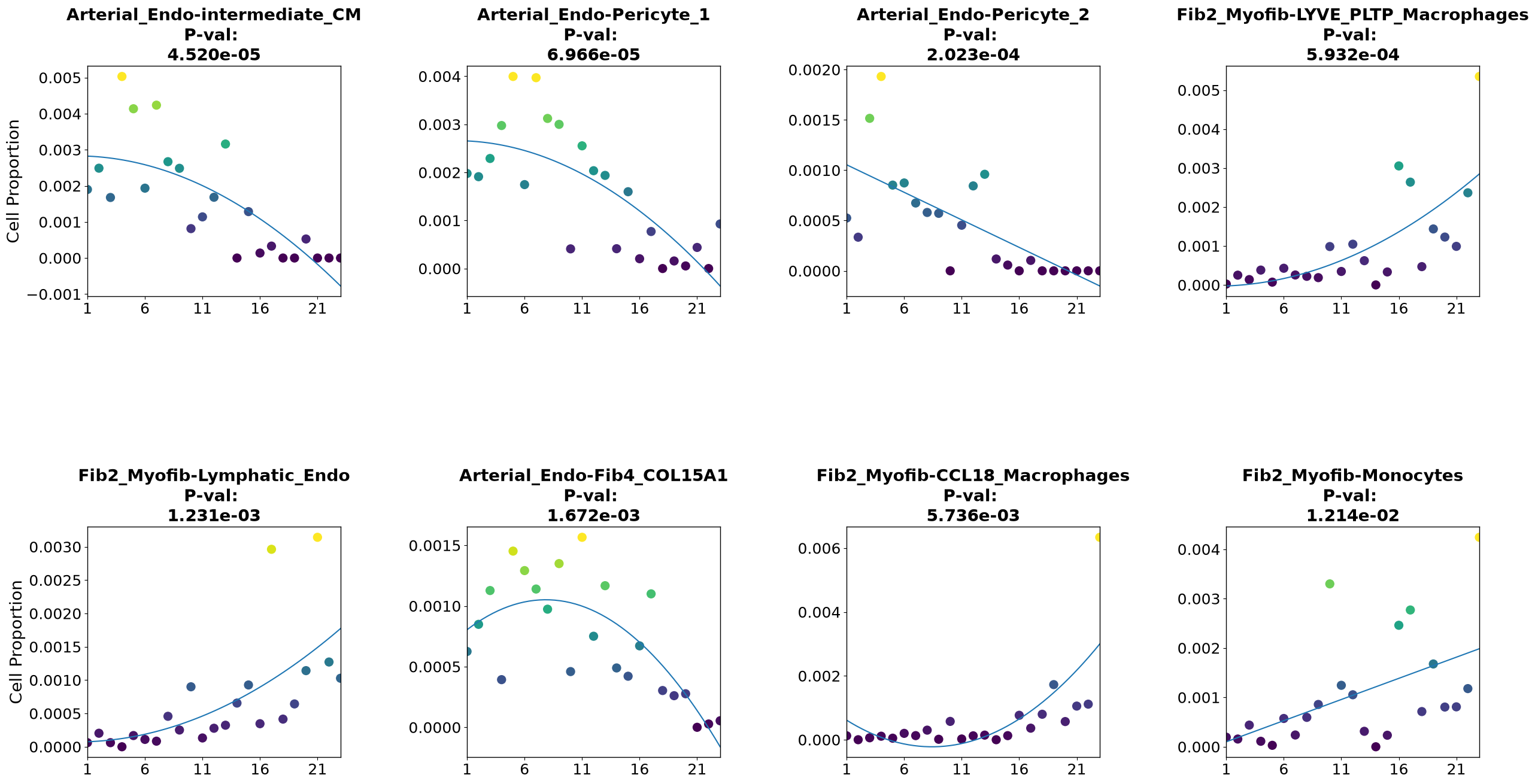
5.3 Cell type pair co-localization along the trajectory#
We can also ask which cell type pair co-localization probabilities are most relevant for disease progression, by correlating them with pseudotime using Spearman’s rank correlation.
[15]:
# Spearman correlation of each cell type pair co-localization with pseudotime
stats = [scipy.stats.spearmanr(coloc[c][PT.index], PT) for c in coloc.columns]

df = pd.DataFrame({
    'pairs':     coloc.columns,
    'statistic': [s.statistic for s in stats],
    'p-value':   [s.pvalue    for s in stats]
}).set_index('pairs').sort_values('p-value')

df.head(10)
[15]:
| statistic | p-value | |
|---|---|---|
| pairs | ||
| healthy_CM-intermediate_CM | -0.904629 | 3.140281e-09 |
| healthy_CM-healthy_CM | -0.873829 | 5.155859e-08 |
| healthy_CM-Pericyte_2 | -0.870959 | 6.443950e-08 |
| Pericyte_1-intermediate_CM | -0.861410 | 1.305091e-07 |
| Capillary_Endo-intermediate_CM | -0.860416 | 1.400318e-07 |
| Fib2_Myofib-Lymphatic_Endo | 0.853188 | 2.301131e-07 |
| intermediate_CM-Pericyte_2 | -0.843694 | 4.251980e-07 |
| healthy_CM-Arterial_Endo | -0.840048 | 5.325711e-07 |
| intermediate_CM-vCM_3 | -0.837564 | 6.189076e-07 |
| Pericyte_1-Pericyte_2 | -0.836229 | 6.702898e-07 |
We select the top co-localization pairs positively and negatively correlated with pseudotime (p < 0.05, |ρ| > 0.6), excluding same-cell-type pairs:
[16]:
sig = df[df['p-value'] < 0.05]

pairs_pos = list(np.setdiff1d(sig[sig['statistic'] >  0.6].index, oneCTints))[:4]
pairs_neg = list(np.setdiff1d(sig[sig['statistic'] < -0.6].index, oneCTints))[:4]

print("Positively correlated:", pairs_pos)
print("Negatively correlated:", pairs_neg)
Positively correlated: ['Fib2_Myofib-CCL18_Macrophages', 'Fib2_Myofib-LYVE_PLTP_Macrophages', 'Fib2_Myofib-Lymphatic_Endo', 'Fib2_Myofib-Monocytes']
Negatively correlated: ['Arterial_Endo-Fib4_COL15A1', 'Arterial_Endo-Pericyte_1', 'Arterial_Endo-Pericyte_2', 'Arterial_Endo-intermediate_CM']
[17]:
coloc_sub = coloc[pairs_pos + pairs_neg]

# Store in AnnData for PILOT's feature_importance function
adata.uns['coloc_names']       = list(coloc_sub.columns)
adata.uns['proportions_coloc'] = dict(zip(coloc_sub.index, coloc_sub.values))
pl.tl.feature_importance applies the same robust regression model as cell_importance, but on arbitrary sample-level features stored in adata.uns:
[18]:
pl.tl.feature_importance(
    adata,
    feature_matrix='proportions_coloc',
    feature_names='coloc_names',
    height=15,
    width=30,
    fontsize=20,
    figsize=(6, 6)
)
plt.savefig('figures/coloc_pairs_trajectory.pdf', bbox_inches='tight')
This concludes the NicheSphere × PILOT tutorial. We have shown how to:
Assign Visium spots to NicheSphere niches and use them as PILOT grouping variables
Compute niche-informed Wasserstein distances between tissue samples
Infer a disease progression trajectory and pseudotime ordering
Identify niches and cell type pair co-localizations that drive disease progression
For the full co-localization and communication analysis, see Nichesphere_tutorial_MIvisium.ipynb.